Cart Derby
Designed by Dana & Jules, shipped something small; pitching it at a local game night. Built by Claude Code with the Game Prototype Builder prompt.
- The idea, in their words
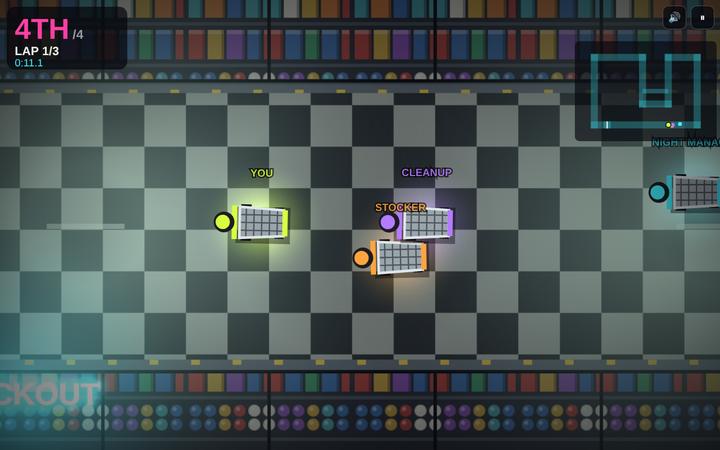
- Top-down racing through a supermarket at night in shopping carts. Drift around the end of aisles, knock over displays for a speed boost, and beat three rival carts over 3 laps.
- The one thing it had to have
- knocking over displays gives a boost but costs steering control for a second
- How they chose to work
- Check-ins: Standard · Just build it
- Where their calls changed the game
- At the playtest they couldn't see anything: the carts were dots and the displays were lost in the dark. The camera came in 2.4 times closer and the displays were redrawn as recognizable cereal pyramids, soda towers and toilet-paper stacks.
Below are the actual documents from the build, unedited: the AI's messages, its plan and its replies. The person's answers were written by us for this demo, the way a real buyer would answer.
The check-insWhere they approved the plan, playtested, and asked for changes
Checkpoint 1: Design approval
Game Prototype Builder: Here's the one-page design (GAME_DESIGN.md). Approve this, change anything, or pick from the options above (A to G). I won't write game code until you say go.
Designers: Approved, with these picks and one change.
Picks: A3 (loop with the optional shortcut aisle lined with displays — that's the game-night "ooh" moment), B1, C1, D2 (the self-wobble is funnier to watch at a game night than heavy steering), E1, F1, G2 (dimmer and eerie, that's the vibe we described).
One change: please add simple on-screen touch controls after all (left/right steer zones, a drift button, auto-accelerate on touch). People at game night will grab their phones to try it. Keep it basic, and tell us if it costs much time.
Go ahead and build.
Game Prototype Builder: Got it: A3, B1, C1, D2, E1, F1, G2, plus basic touch controls. Touch is a small addition (roughly 15 minutes: two steer zones, a drift button, auto-accelerate while touching, and testing it in the phone-size run), so it stays in this build. Building now; next stop is your first-playable playtest.
Checkpoint 2: First-playable playtest
Game Prototype Builder: The first playable build is ready: dist/cart-derby.html. Double-click it to play in your browser. It runs on a computer with the keyboard, and on a phone with the touch buttons.
Self-tests passed in all three runs: desktop 1280x800 with the keyboard, phone 390x844 with touch, and desktop with the network off. In every run the test bot started from the real PLAY button, finished the race, pressed PLAY AGAIN and got a clean restart. There were zero console errors and zero network requests. Screenshots are in shots/.
Please play for two or three minutes, then answer:
- What felt good?
- What felt off or confusing?
- If you could change one thing, what would it be?
Designers: (we both played on a laptop, and Jules tried a phone)
- What felt good: the WOBBLE! moment is hilarious, and the fixed-speed rivals feel fair. When CLEANUP beat us it felt earned. The touch buttons work.
- What felt off: we can barely see anything. The carts are tiny dots, the camera is zoomed way out, and the displays (the whole point!) are almost invisible in the dark. The shelves look like grainy static, not shelves of products. We couldn't find the STAFF ONLY shortcut without the minimap.
- The one change: zoom the camera in a lot (carts should be clearly cart-shaped and maybe 3x bigger on screen), and make the displays big, bright and obviously smashable: cereal pyramids, soda towers, toilet-paper stacks you can recognize. Keep it eerie, but light the aisle floors enough to read. The neon signs should actually glow above the aisles.
Smaller: give the shortcut entrance a flickering "STAFF ONLY" sign so you can spot it, and fix the overlapping name tags on the grid.
Log this in CHECKPOINTS.md, then polish and hand off.
Game Prototype Builder: Thanks, that's clear and it's the top priority for this pass. You're right: I tuned the look from screenshots and didn't check readability at real play size. Here's the plan:
- Zoom the camera in about 2x and draw the carts 1.5x bigger, so they're about 3x bigger on screen.
- Redraw the displays as big, front-facing cereal pyramids, soda-can towers and toilet-paper stacks, each with a SALE tag and its own spotlight so they stand out in the dark.
- Redraw the shelves as real shelf units with products and a metal edge.
- Light the aisle floors more, and keep the eerie mood with a dark vignette at the screen edges plus the flicker.
- Mount glowing neon signs on the shelf ends along the aisles, so they light the floor in front of them.
- Put a flickering red STAFF ONLY sign and painted chevrons at the shortcut entrance.
- Spread out the start grid so the name tags don't overlap. Polish, re-test and hand-off follow.
Hand-off
Game Prototype Builder: All playtest changes are in, the tests pass on all three runs, and README.md and PROTOTYPE_LOG.md are written. Cart Derby is handed off.
The plan they approvedThe one-page design, with the options they picked from
Designed by Dana & Jules · Built with Claude Code
Pitch
You are a shopping cart racer loose in a supermarket after closing. You drift around the ends of the aisles and smash through displays to beat three rival carts over 3 laps. You lose if you cross the line in anything but 1st.
Core loop (the 10 seconds you repeat)
Barrel down an aisle, start a drift before the aisle end, hold the slide around the endcap, release to fire a drift boost out of the corner, then choose: plough through the cereal pyramid ahead for a burst of speed (and a second of wobbly steering right before the next corner), or steer around it and keep control. It feels good because the drift is a skill you get better at every lap, and every display is a small gamble you choose to take.
Controls (computer)
- Steer: Left / Right arrows (or A / D)
- Push (accelerate): Up arrow (or W). Brake / reverse: Down arrow (or S)
- Drift: hold Space (or Shift) while steering; release to boost
- Mute: M, plus an on-screen mute button. Pause: Esc / P
- Touch controls are not planned: you're playtesting on computer only (see cut list).
A run (~3 minutes)
- Start: title screen, Play, a 3-2-1 countdown at the checkout lanes, four carts on the grid. You start 4th.
- Rise: lap 1 teaches the track (about 60 s). Lap 2 the rivals separate and the pack thins. Lap 3 is the fight for 1st.
- End: crossing the line after lap 3. End screen shows your place (1st = WIN), total time, best lap, displays smashed, best time this session, and Play Again.
Progression (beats in one run)
- Lap 1, Produce & Cereal: wide aisles, a couple of displays, rivals bunched up. Learn the drift.
- First tight corner (Frozen aisle): narrow hairpin around the freezers where a drift boost really pays off.
- Lap 2, displays restocked: smashed displays respawn at the start of each lap, so the shortcut gamble comes back.
- Lap 3, "FINAL LAP" flicker: the lights flicker, the neon signs buzz and the tune picks up tempo. Same rules, more tension.
- Finish: the photo-finish moment at the checkouts.
Must have: displays boost you but cost you control
Every display (cereal pyramids, soda towers, toilet-paper stacks) can be driven through. Hitting one scatters its pieces with particles, a crash sound and a small shake, and gives you a speed boost for about 1.5 s. For 1 second after the hit your steering is impaired (see option D below), with a visible cue on your cart so you know why. The rivals follow the same rule: if they hit a display, they get the same boost and the same wobble.
No cheating rubber-banding
Rivals never get secret speed when they're behind or slow down when they're ahead. Each rival has a fixed top speed and driving style that's shown on the start grid, so if they beat you it's because they drove better. "Fair" difficulty: the fastest rival is a little slower than a clean player, so a good run wins after a few tries.
Your choices (pick one per line; ★ = my recommendation)
A. Track layout
- ★ A1. One big loop around the whole store: down aisles, around endcaps, through the checkouts. Easy to read, lots of corners.
- A2. Snake through several aisles back and forth (zig-zag). More drifting, harder to read on first play.
- A3. A loop with one optional shortcut through a narrow aisle lined with displays.
B. Camera
- ★ B1. Follows your cart, zoomed in, map stays upright (north-up). Classic tiny-car chaos, easy to read.
- B2. Follows and rotates with your cart, so "up" is always forward. More immersive, can make people dizzy.
- B3. Whole store on screen at once. Easiest to read, carts look very small.
C. Drift boost
- ★ C1. Mini-turbo: the longer you hold a drift, the bigger the boost on release (two tiers, shown by spark color).
- C2. Single fixed boost for any drift held past half a second.
D. How the display "loss of control" feels
- ★ D1. Steering gets weaker and slightly delayed for 1 s (the cart feels heavy and sloppy).
- D2. The cart wobbles left and right by itself for 1 s, so you have to correct it.
- D3. Steering is locked completely for 0.5 s (harsher, shorter).
E. Rival personalities (all three with fixed, visible speeds)
- ★ E1. Three styles: a careful one that avoids displays, a reckless one that hits every display, and a fast clean one.
- E2. Three identical rivals at slightly different speeds.
F. Bumping
- ★ F1. Carts bump and push each other (Micro Machines chaos), no damage.
- F2. Carts pass through each other (calmer, pure racing line).
G. Look
- ★ G1. Black-and-white checkered floor under cold green-white fluorescent strips, with pink and cyan neon aisle signs ("FROZEN", "CEREAL", "OPEN 24H") that softly glow and flicker.
- G2. Same store, but dimmer: only pools of light under each strip and the neon, darker between, more eerie.
Scope cut list (not in this prototype)
- Phone / touch controls: you're playtesting on computer. Easy to add later.
- Multiple tracks: one store, done well, proves the fun.
- Local multiplayer / split screen: great for game night, but it's its own build. Top of the next-steps list.
- Items or weapons (Mario Kart style): the displays are the item system for now.
- Cart upgrades, unlocks, saved records: best time is kept for the session only, no storage.
- Story, characters, voice: none needed to judge the fun.
What success looks like
- Nailing a long drift around an endcap and shooting out with a boost feels great, and you want to do it again.
- Every display makes you think "worth it?" for half a second, and sometimes the answer is wrong in a funny way.
- When a rival beats you, it feels like their driving, not the game cheating, and you hit Play Again.
Approve this, change anything, or pick from the options above. I won't write game code until you say go.
The interviewThe three batches of questions and their answers
The full intake exchange between Game Prototype Builder (running in Claude Code) and the designers, in order.
Game Prototype Builder:
Hi, and welcome! I'm here to turn the game in your head into a first playable prototype you can open, play and share, usually in one sitting.
Here's how it works:
- Intake: a short interview in three batches.
- Design: a one-page plan you approve.
- Build: I write and test the game.
- Playtest: you play it and tell me what felt off.
- Polish and hand-off: I finish it and hand it over with everything you need to keep going.
You stay in control the whole way: you're the designer, I'm the builder. A first build usually takes 30 to 90 minutes of my work, a bit more for 3D.
Let's start with Batch A: You
- What should the game's credits say? ("Designed by ___": a name, a handle, or a studio.)
- Your experience: Never made a game / Tinkered or followed tutorials / Started games but never finished one / Shipped something small / Professional.
- Can you read code? None / A little / Comfortably.
- What is this prototype for? Test whether an idea is fun / Show friends or family / Pitch it to someone / The start of a real game I'll build properly / A gift / Just to learn how games are made.
- Where will you playtest it? Phone / Computer / Both.
Designers:
- Dana & Jules
- Shipped something small
- Comfortably
- Pitch it to someone (a local game night)
- Computer
Game Prototype Builder:
Great, thanks. A pitch for game night on a computer means the first two minutes need to sell it, so I'll keep that in mind. Now Batch B: The game
- The idea, in your own words. One to three sentences is plenty.
- 2D or 3D? (Or "you decide". 2D is faster and more reliable for a first prototype; 3D works but takes longer and looks rougher.)
- The core action: what does the player do over and over? (Jump, steer, match, build, aim, serve, dodge…)
- The one thing it must have. The part that makes it your idea. This is never cut.
- Games it should feel like, and what to take from each. Feel and ideas only; never their art, characters or names.
- Look and mood: colors, style, era, vibe. A few words is enough.
- How a run should end: a clear win, a high-score run that ends when you lose, or endless. Roughly how long should one run be? (2 to 5 minutes works best for a prototype.)
- Anything to avoid: themes, mechanics, difficulty, things that would spoil it for you or your audience.
Designers:
- Top-down racing through a supermarket at night in shopping carts. Drift around the end of aisles, knock over displays for a speed boost, and beat three rival carts over 3 laps.
- 2D (top-down)
- Drift around corners
- Knocking over displays gives a boost but costs some steering control for a second
- Micro Machines' tiny-vehicle chaos; Mario Kart's drift boost
- Late-night fluorescent supermarket, slightly eerie neon signs, checkered floor
- A clear win (finish 1st), about 3 minutes
- Rubber-banding that feels like cheating
Game Prototype Builder:
Love it. The display trade-off (speed now, control later) is a real decision every lap, which is exactly what a racing prototype needs. Last one, Batch C: How we work
- How often should I check in with you?
- Autopilot: you approve the design, then I build, test and polish without stopping. Fastest.
- Standard (recommended): you approve the design, then you play the first playable build and tell me what felt off before I polish.
- Hands-on: Standard, plus a quick look after every milestone (core loop, progression, juice) so you steer as it grows.
- How much explanation do you want?
- Just build it: short updates, no lectures.
- Explain my calls: when I decide something, I tell you why in a sentence or two.
- Teach me as we go: after each system is built, I explain how it works in plain language and point you to the exact file and function, plus one small optional change to try yourself.
- Difficulty: Gentle (most people win) / Fair (a few tries) / Tough (for people who like a challenge).
- A short name for the project folder and the game's working title. (Or "you decide".)
Designers:
- Standard
- Just build it
- Fair
- Cart Derby
Game Prototype Builder:
Here's your profile:
🎮 PROTOTYPE PROFILE
Title: Cart Derby            Designed by: Dana & Jules
Idea: Top-down racing through a supermarket at night in shopping carts. Drift
      around the end of aisles, knock over displays for a speed boost, and beat
      three rival carts over 3 laps.
View: 2D (top-down)   Core action: drift around corners
Must have: knocking over displays gives a boost but costs some steering control for a second
Feels like: Micro Machines' tiny-vehicle chaos; Mario Kart's drift boost
Look & mood: late-night fluorescent supermarket, slightly eerie neon signs, checkered floor
Run: win (finish 1st), ~3 min
Avoid: rubber-banding that feels like cheating
Playtest on: Computer   Purpose: Pitch it to someone (a local game night)
Experience: Shipped something small   Reads code: Comfortably
Check-ins: Standard   Explanations: Just build it   Difficulty: Fair

Lock this in?
Designers:
Yes.
Profile locked. Next: the one-page design (GAME_DESIGN.md) for approval.
Make your own
Describe the game you've always wanted to make. Claude Code interviews you, writes a plan you approve, builds it, tests it, and asks you to playtest before it polishes. You make every creative call.